
Free extension · Chrome, Edge, Firefox
Ông Chú MMO – Săn Sản Phẩm Win Mỗi Ngày
“Săn Sản Phẩm Win Mỗi Ngày” means “hunt winning products every day.” A helper for TikTok affiliates: see which products are trending in each niche, which channels are worth partnering with and when to post, right on TikTok Web. The video download toolkit is free; the affiliate analytics are in the Pro plan, which also works on sanphamwin.com.
Formerly: TikTok Dễ Ẹc
Install free for your browser
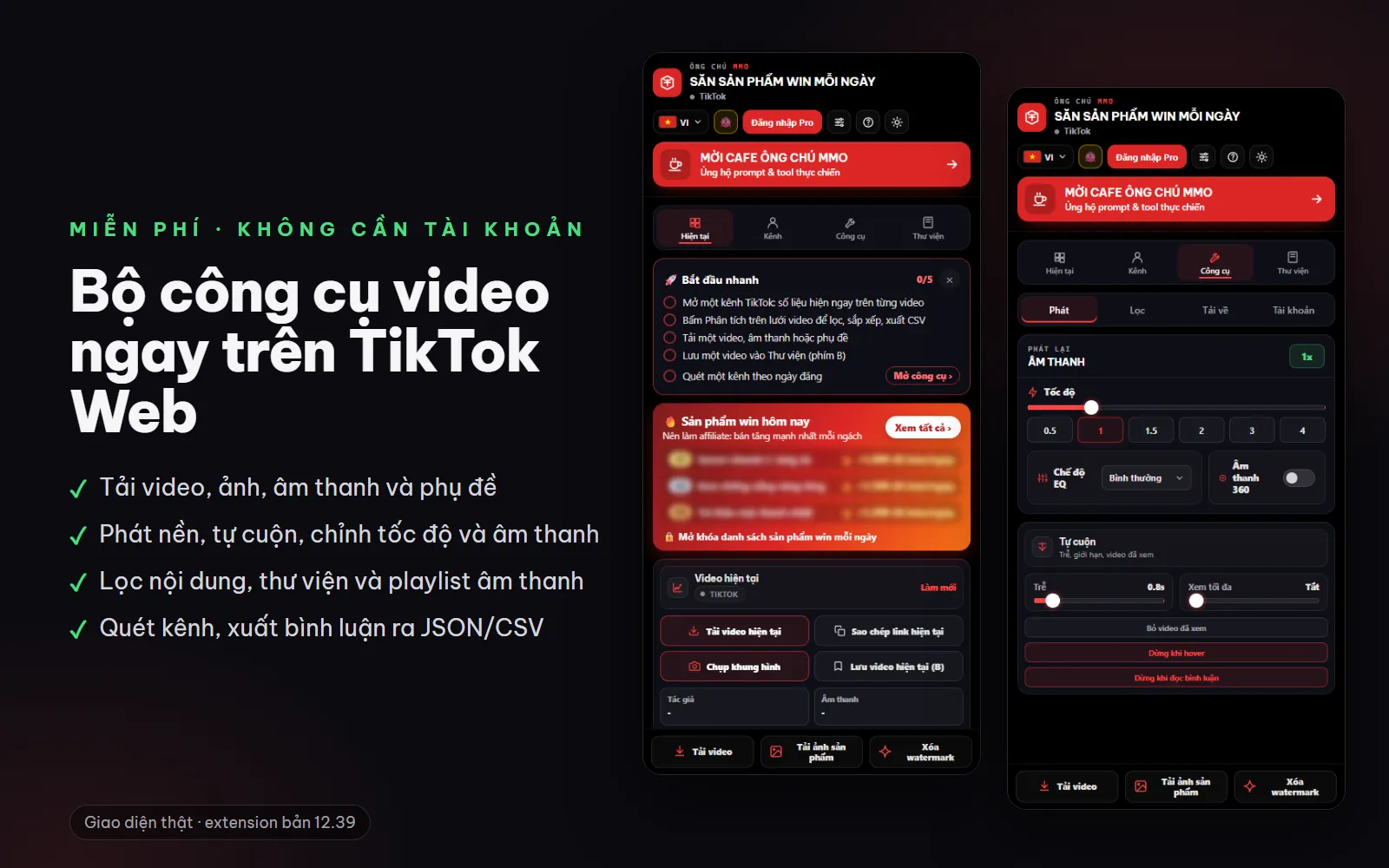
Image 1: An extension for TikTok affiliates on Chrome, Edge and Firefox, with a web version at sanphamwin.com.
What is Săn Sản Phẩm Win?
An extension for Chrome, Edge and Firefox that runs right on TikTok Web. The free version makes it more comfortable to watch and download short videos. The Pro plan reads the numbers on the page for you and answers the questions affiliates ask: which videos are outperforming, which channels are worth partnering with, which niches are still open, what shoppers are asking to buy, and which products are selling best. When you're away from your computer, look up trending products on the sanphamwin.com web version.
Who it's for
- TikTok Shop affiliates who need to pick products and niches faster
- Content creators who want to know which competitor videos are taking off
- Brands and agencies that need to find KOCs (key opinion consumers) and send channel reports to partners
- Regular TikTok viewers who want to download videos, play them in the background and filter content
Features by plan
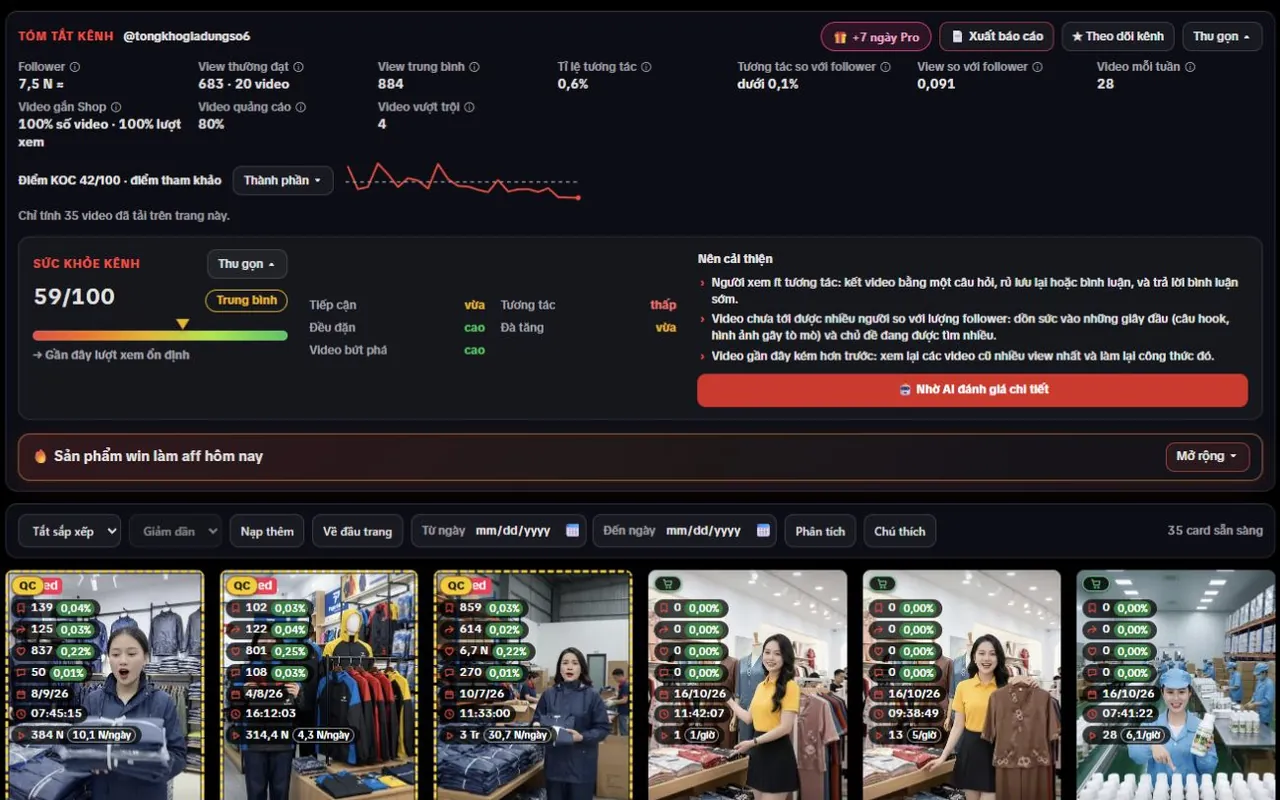
Images labeled “real screenshot” show the extension running on TikTok; “real interface” shows the extension's own page; “illustration” simulates a feature with sample data. Screenshots show the extension's Vietnamese interface.
Free
No account needed0 VND · Ready to use right after installA toolkit for watching and downloading short videos right on TikTok Web. Free features send nothing to the Pro server.
Downloads
Download videos, HD videos, MP3 audio, cover images and slideshow photos, or batch-download many links at once.
Watch videos more comfortably
Background playback when you switch tabs, auto-scroll, Picture-in-Picture, speed control, EQ, bass boost and voice boost.
Content filters
Filter by caption, author, hashtag, sound or comments; choose to skip, hide, blur or mute.
Subtitles and comments
Download SRT/TXT subtitles; collect comments with their replies and export them as JSON or CSV.
Metrics on the video grid
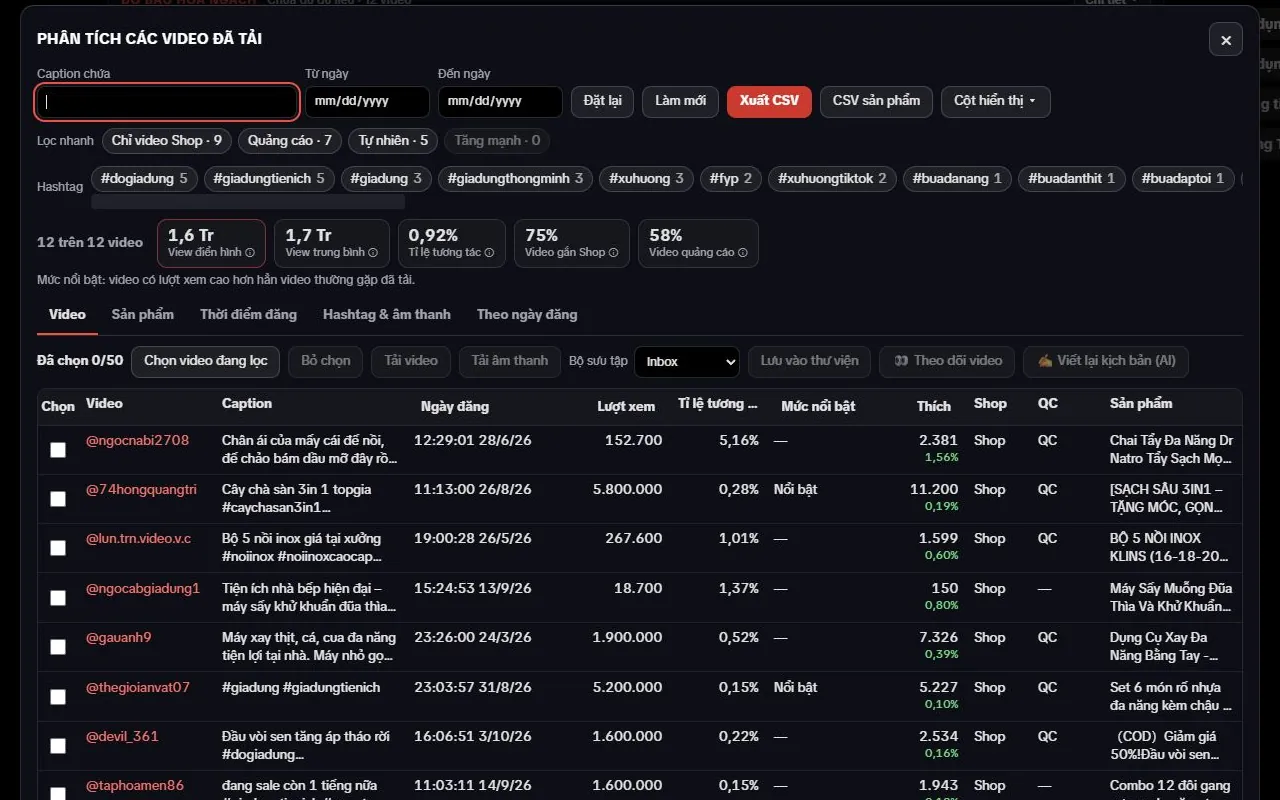
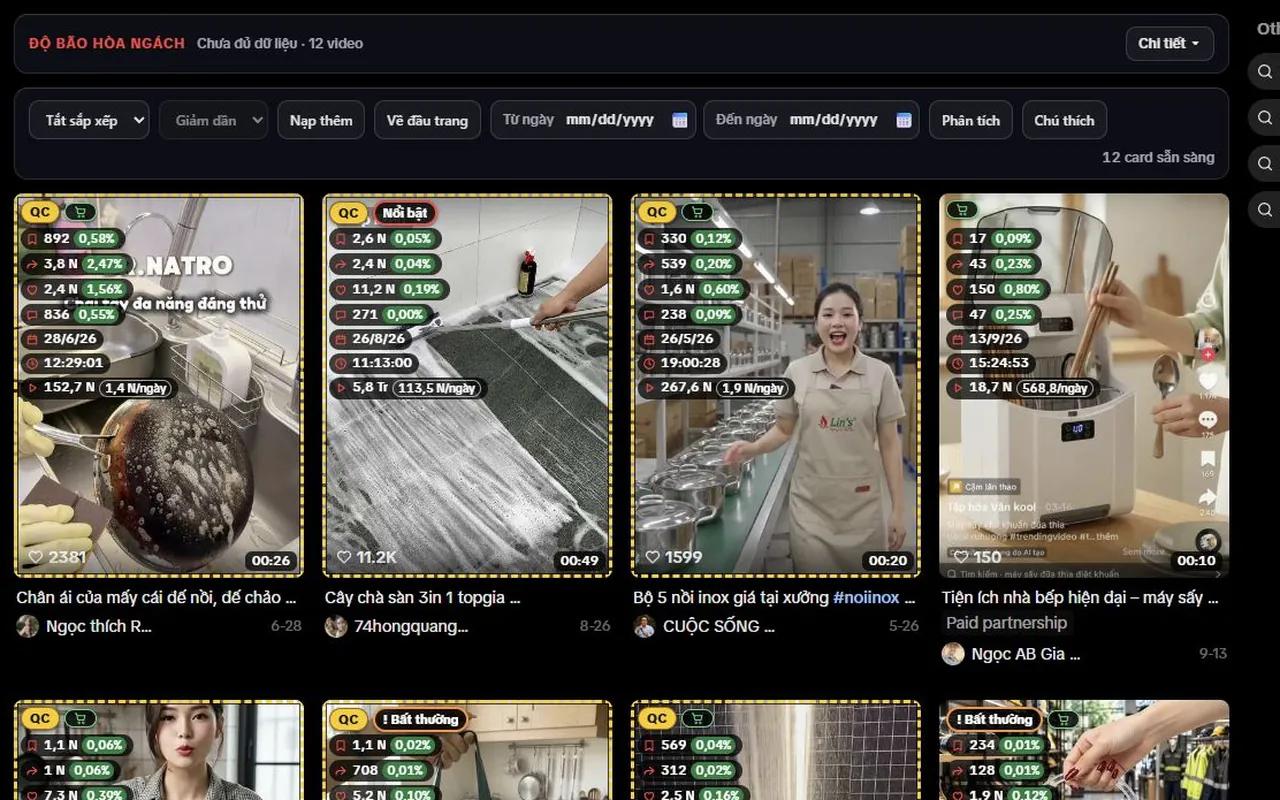
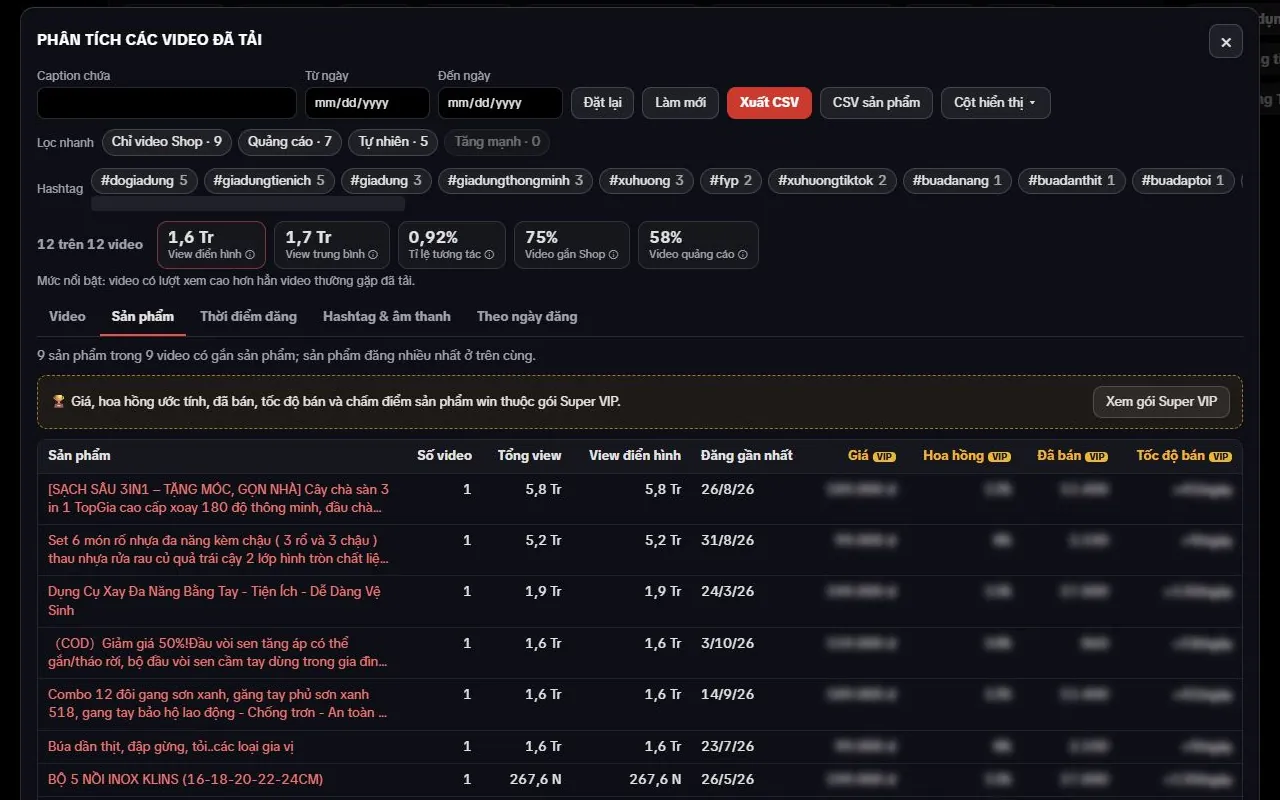
Views, likes, comments, shares, saves and posting date on each card; filter by posting date range, with a basic analytics table and CSV export.
Channel scans and library
Scan a channel over a posting date range, see how many videos were made for each product, grouped by shop; bookmarks, notes and audio playlists.
Pro
Most popularfrom 99,000 VND · 1, 3 or 6 months · prepaid, no auto-renewalThe free version gives you raw numbers. Pro reads those numbers for you on the Pro server and puts the answers right on TikTok.
Hot products today
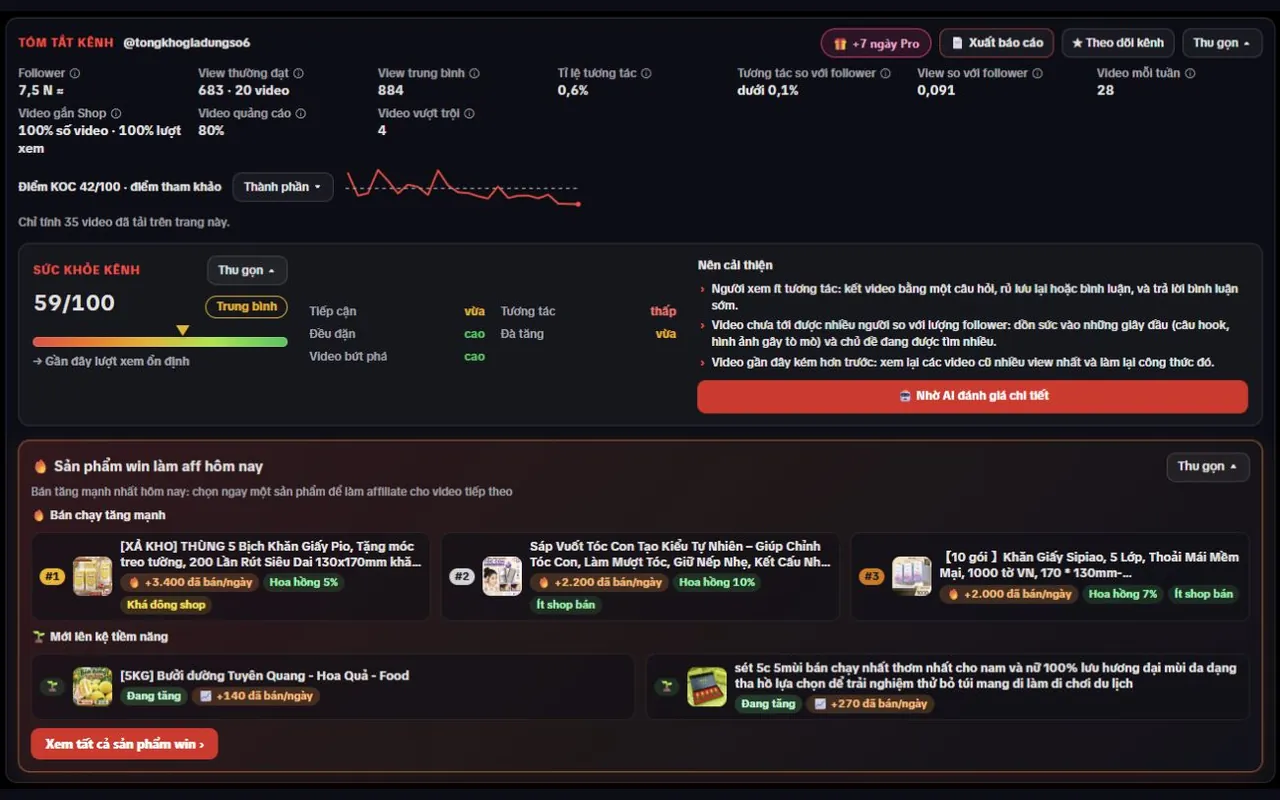
Every day, see at a glance which products are surging in sales by niche and which are newly listed, right on TikTok or in the Affiliate Hub.
Labels on the video grid
Videos outperforming their channel, view velocity, fast-rising videos and unusual engagement, shown right on each video card.
Channel summary, channel health and KOC score
Reach, engagement, Shop and ad ratios, a reference KOC score and channel health with improvement tips, on every channel page.
Best times to post
See the time slots in the week when a channel's videos usually get the most views, so you can post at the right moment.
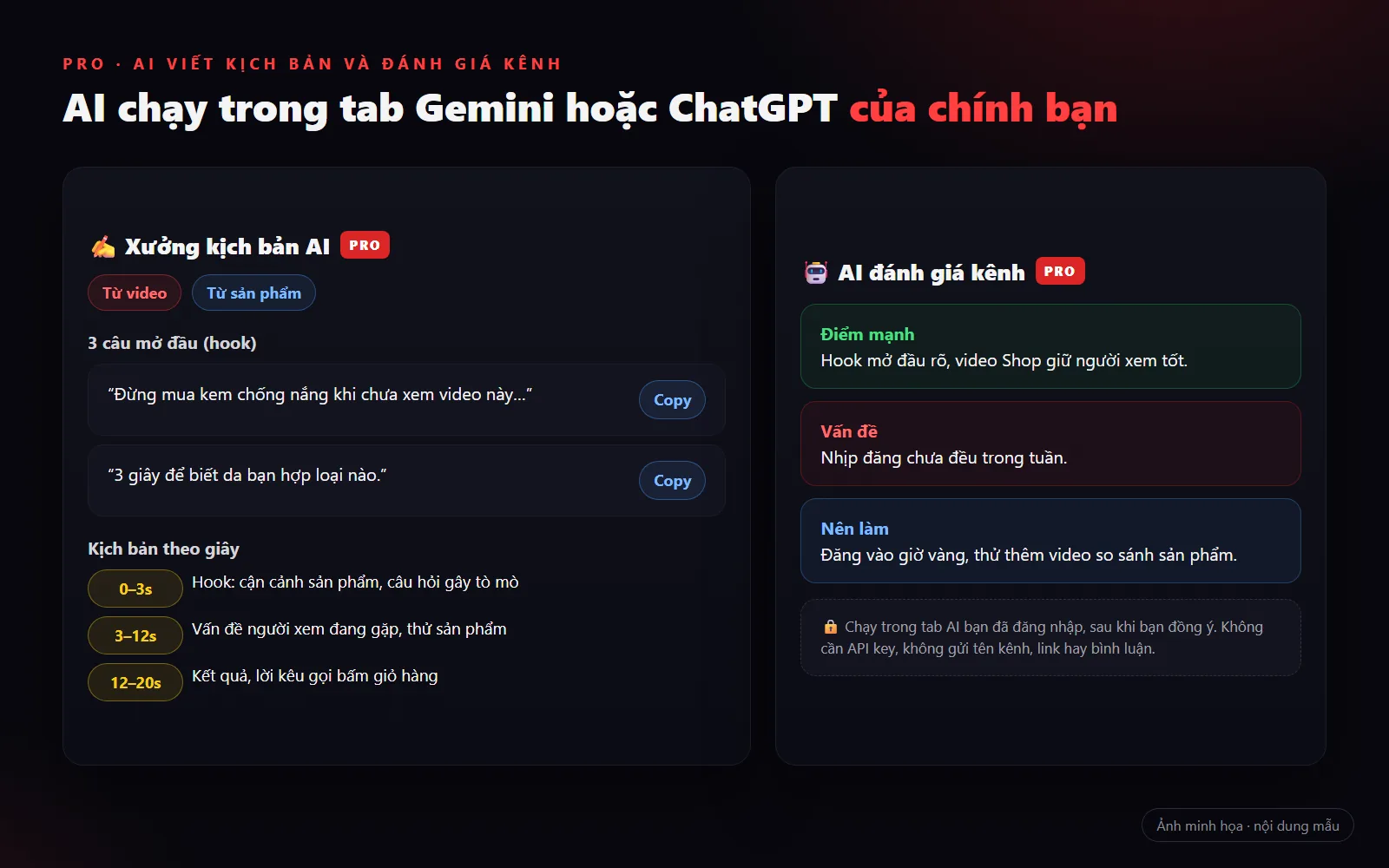
AI script writing and channel review
Have your own Gemini or ChatGPT rewrite video scripts, write scripts for a product and review a channel with improvement tips.
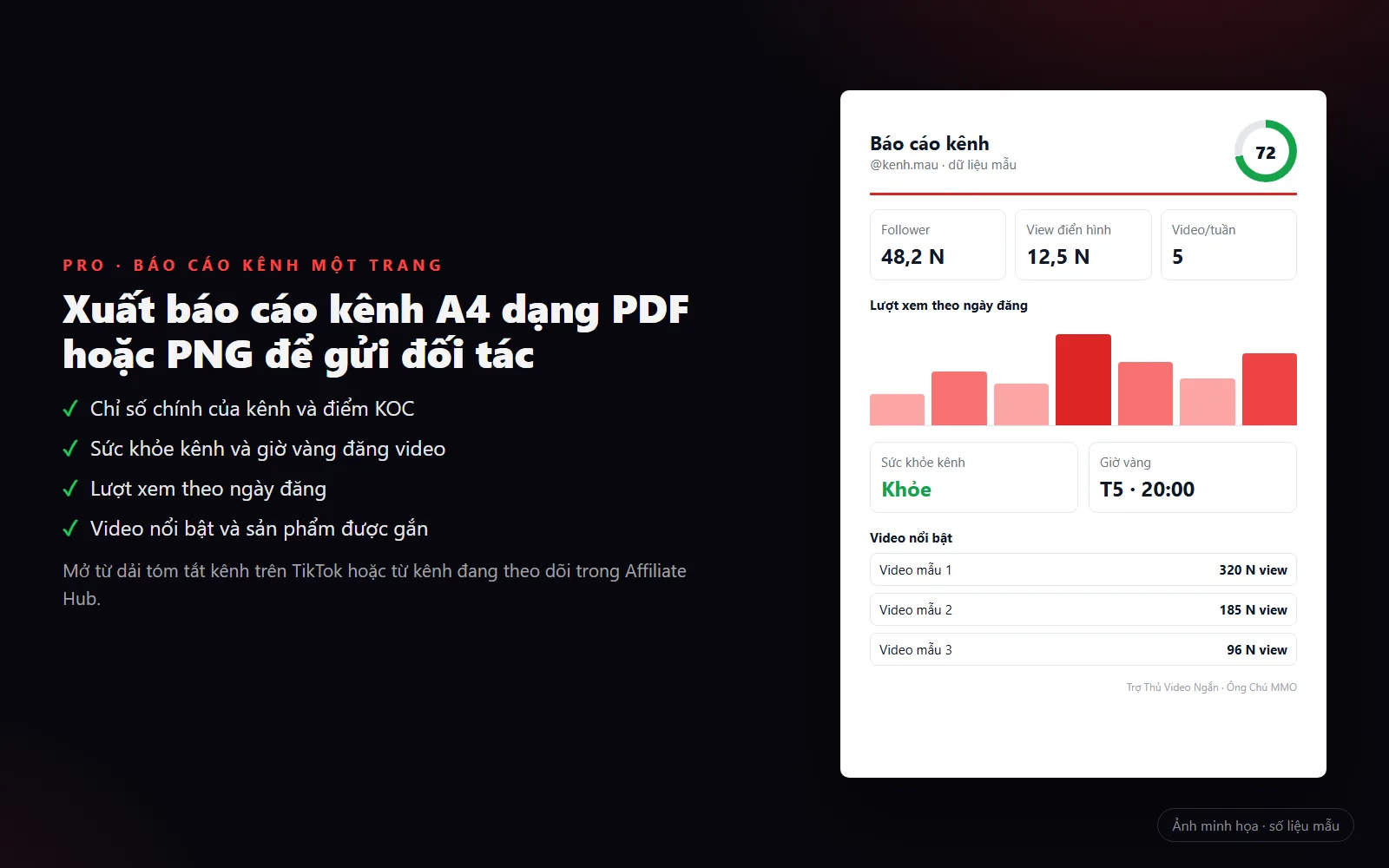
KOC search and channel reports
Filter for suitable KOCs right in the Users tab of TikTok search, and export a one-page A4 channel report as PDF or PNG to send to partners.
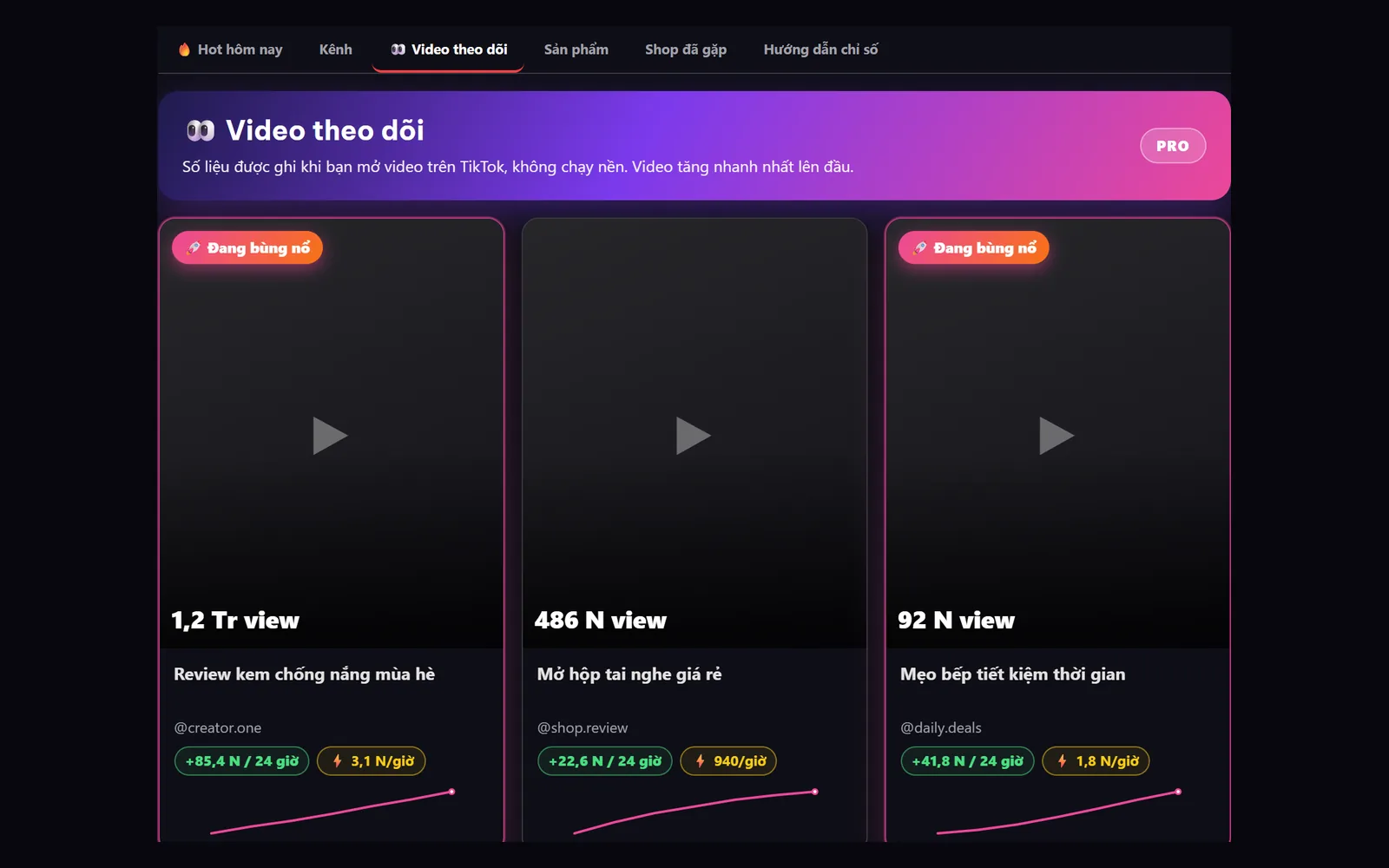
Competitor video tracking
Save competitors' videos and see how they've grown each time you come back.
Niche saturation and buying intent
Whether a niche is open, competitive or saturated; questions about price, where to buy and delivery, and objections in the comments.
Competitor and product tracking, plus affiliate tools
See what has changed since your last visit and compare channels side by side; a commission calculator, ad and TikTok Shop labels, product links in CSV, and bulk actions.
Super VIP
Top tierContact us · Add Ông Chú MMO as a friend on Zalo or FacebookEvery Pro feature, plus product metrics and winning-product scoring.
The full hot list for every niche
The complete hot-product list for every niche, not just the top highlights.
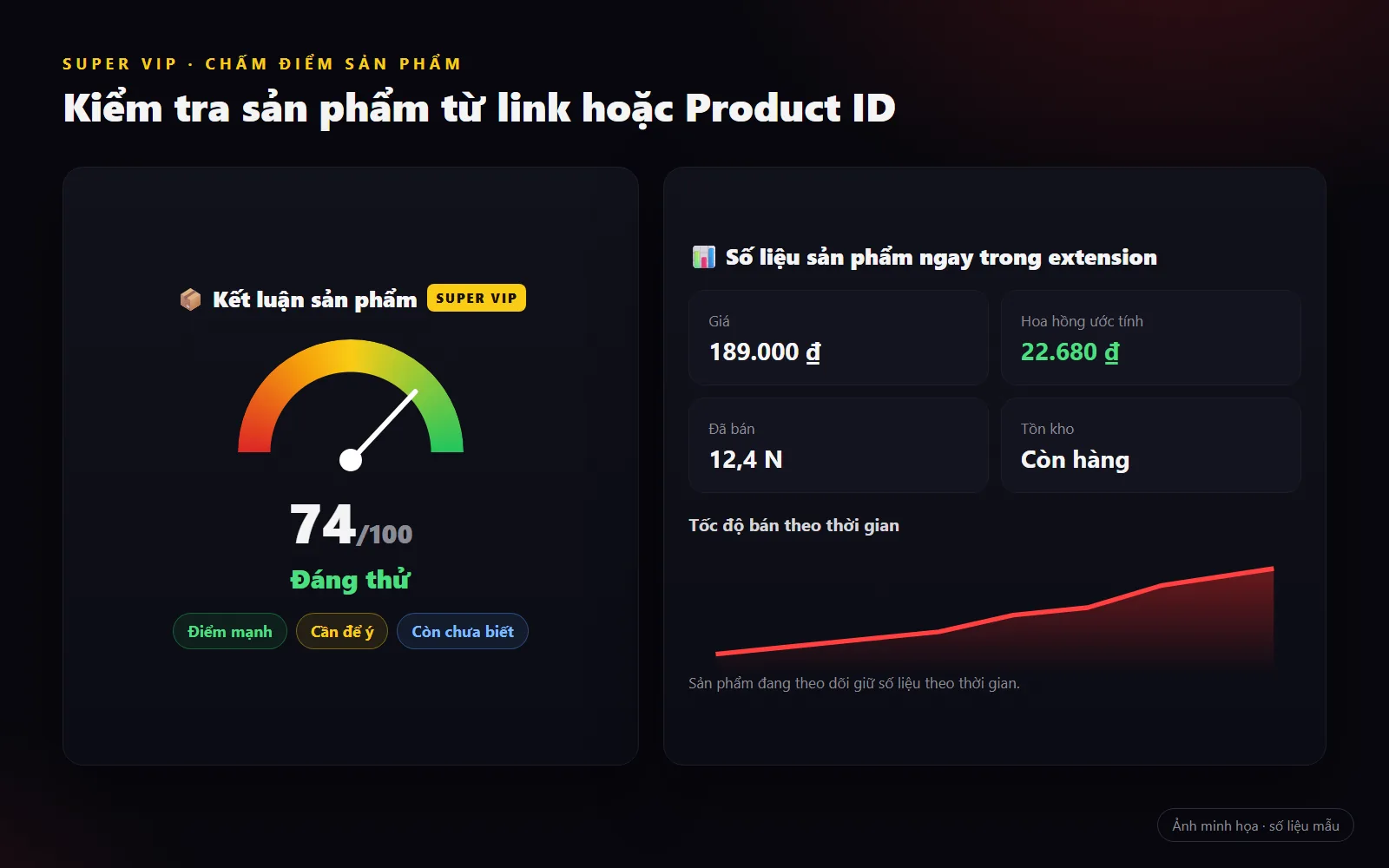
Product scoring
Score a product from its link or Product ID: a score out of 100, strengths, warnings and what is still unknown.
Product metrics inside the extension
Price, estimated commission, units sold, sales speed and stock.
Tracked products keep their metrics
Products you track keep their metrics over time.
Web version · same Pro account
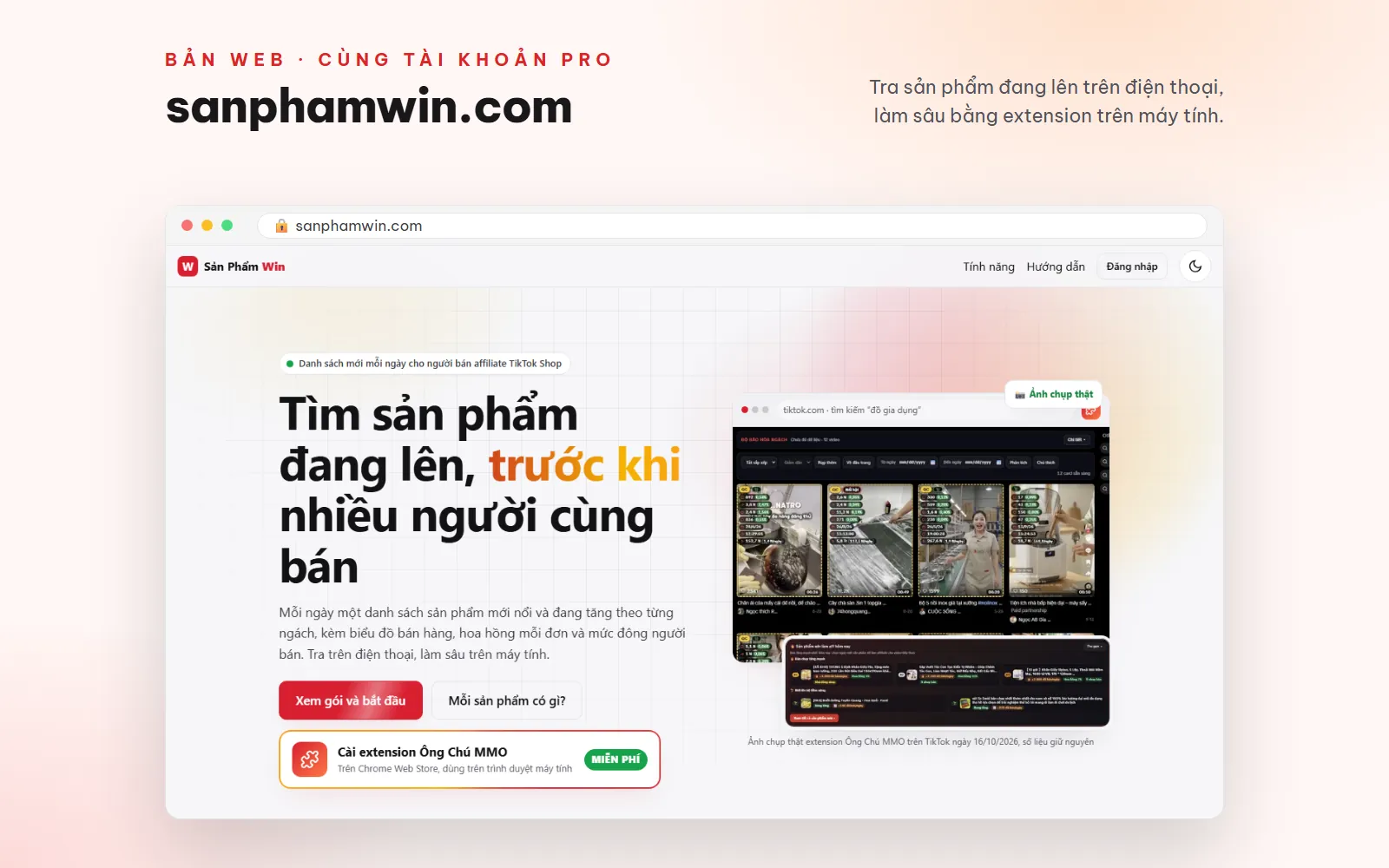
Use it on the web: sanphamwin.com
The web version of Săn Sản Phẩm Win: lists of emerging and rising products by niche, with sales charts, commission per order and how crowded each product is with sellers. Opens on your phone, nothing to install.
- Sign in with the Gmail account that bought Pro or Super VIP: one plan works on both the website and the extension.
- Your saved product list is shared between the website and the extension.
- Look things up fast on your phone, dig deeper with the extension on your computer.
Invite a friend — you both get 7 free days of Pro
Get your invite link on the extension's Pro page. When your friend pays for their first plan, they get 7 more days of Pro and you get 7 days at the same time.

Install and activate
Install from the official extension store of the browser you use. Versions installed from the store update themselves when a new version is released.
 ChromeChrome Web StoreAdd to Chrome
 EdgeMicrosoft Edge Add-onsAdd to Edge
 FirefoxFirefox Add-onsAdd to Firefox
Step 1
Install the extension
Pick the browser you use: Chrome Web Store, Microsoft Edge Add-ons or Firefox Add-ons, click add to browser, then pin the icon to the toolbar.
Step 2
Open TikTok Web
Go to tiktok.com and click the extension icon. The free toolkit works right away, no account needed.
Step 3
Sign in to Pro with Google
In the extension, open Settings (Cài đặt) › Pro account (Tài khoản Pro), or click Sign in to Pro (Đăng nhập Pro), and sign in with Gmail.
Step 4
Choose a plan and pay
Choose a plan on pro.ongchummo.com, scan the VietQR code with your banking app and keep the transfer note exactly as shown. Pro activates automatically within seconds, no code to enter; the same Gmail account signs you in on sanphamwin.com.
Privacy and safety
AI runs in your own tab
AI script writing and channel review run in the Gemini or ChatGPT tab you are already signed in to, only after you agree and click the button. No API key needed; channel names, links, IDs and comments never leave your browser.
It doesn't take your TikTok login data
The extension does not send your TikTok cookies or account. When TikTok asks for verification (CAPTCHA), the extension stops and lets you solve it yourself. When you download a video, the video link may be sent to a supporting download service to fetch the file.
The free version sends us nothing
Pro sends your Gmail, the device's public key and numbers with random codes in place of videos, channels, hashtags and sounds; Super VIP also sends the Product ID when you look up a product. No links, channel names, captions or comment text are sent.
Your watchlists stay on your device
The channels, videos and products you track are stored only in your browser, and only after you agree; export or delete them at any time.
Details: privacy policy · refund policy. Not affiliated with TikTok, ByteDance, Google, Microsoft or Mozilla.
Update history
Extension changelog
Checked against the source code and CHANGELOG on October 9, 2026. The Chrome Web Store release schedule for these versions hasn't been confirmed.
v12.25.0 · Hot products, product metrics and Super VIP scoring
• Pro: see hot products by niche and the Products tab in the analytics table. • Super VIP: see the full hot list, price and estimated commission figures, units sold and product scoring, once the project owner has enabled access for the account. • The analytics table has column selection, engagement rates and easier-to-read charts. • The products table explains missing data and lets you refresh it. • Better video playback across TikTok tabs; background tabs no longer autoplay. • Stronger protection for personal API keys, and saved metrics are cleared when you sign out of Pro.
v12.24.0 · Channel scans by date, with product and shop roll-ups
• Choose a date range when scanning an account; videos within the range are kept. • Detects multiple products attached to the same video. • The free products table adds statistics, filters and product–video CSV export. • Groups products by shop from the scanned videos; this is not the shop's full catalog.
v12.23.0 · Channel and niche analysis, and buying intent in comments
• Pro: a channel health summary from the videos loaded in the tab. • Rates how competitive a niche is from the search results. • Classifies buying intent in comments and adds columns when you export data. • Results are reference signals from observed data and do not guarantee revenue.
Who makes it
Who is behind this product

Ông Chú MMO
AI Operator & Tool Builder
Builds script-writing chatbots, automation workflows and hands-on tools for people making money online. 5+ years of experience in AI automation.
Discussion
Comments
Frequently Asked Questions
Chrome, Microsoft Edge and Firefox on a computer. Each browser installs from its own official extension store: Chrome Web Store, Microsoft Edge Add-ons or Firefox Add-ons. A Pro plan is tied to your Gmail account, not to a browser.
It is the web version of Săn Sản Phẩm Win, running on the same Pro server as the extension. You look up trending product lists on your phone or computer with the Gmail account that bought Pro or Super VIP; your saved list is shared with the extension.
Yes. TikTok Dễ Ẹc is the old name; the current name on all three stores is Ông Chú MMO – Săn Sản Phẩm Win Mỗi Ngày. Pro is tied to your Gmail account, so it keeps working after the rename.
Yes. The toolkit for video downloads, background playback, content filters, subtitles, comments, raw metrics on the video grid and channel scans is free, no account needed. You only need Pro for the affiliate analytics.
Pro is sold at pro.ongchummo.com (not through this site's cart). Sign in with Gmail, scan the VietQR code and keep the transfer note exactly as shown; Pro activates automatically within seconds and the extension updates itself, no code to enter.
Pro costs 99,000 VND for 1 month, 249,000 VND for 3 months and 399,000 VND for 6 months. Plans are prepaid and do not auto-renew; buying more while you still have time left adds the days together.
Super VIP includes every Pro feature, plus the full hot-product list for every niche, product metrics right in the extension, product scoring from a link or Product ID, and the metric history of products you track. Contact Ông Chú MMO on Zalo or Facebook for advice.
No. The AI runs in the Gemini or ChatGPT tab you are signed in to, after you agree. Gemini/ChatGPT plans and limits are set by those providers.
Each Gmail account can use Pro on one computer at a time. You can switch computers up to 3 times in 30 days; the old computer loses Pro the next time it connects.
The free features keep working as normal; Pro labels and panels are locked until you renew. Your tracked lists can still be viewed, exported and deleted.
Yes. Within 7 days, if Pro is unusable because of a fault on our side that can't be fixed, you get a full refund under the refund policy on pro.ongchummo.com.
When a friend signs up through your invite link and pays for their first plan, you both get 7 more days of Pro.
Related products
See all



Ready to find winning products before everyone else?
Install the free version to use the video toolkit. When you need hot products, golden hours, KOCs and the AI script writer, upgrade to Pro at pro.ongchummo.com.